Work Order Template
A ready-to-use work order log for Excel or Google Sheets — track every job with priority, labor hours, parts, and failure cause. Free, no signup.
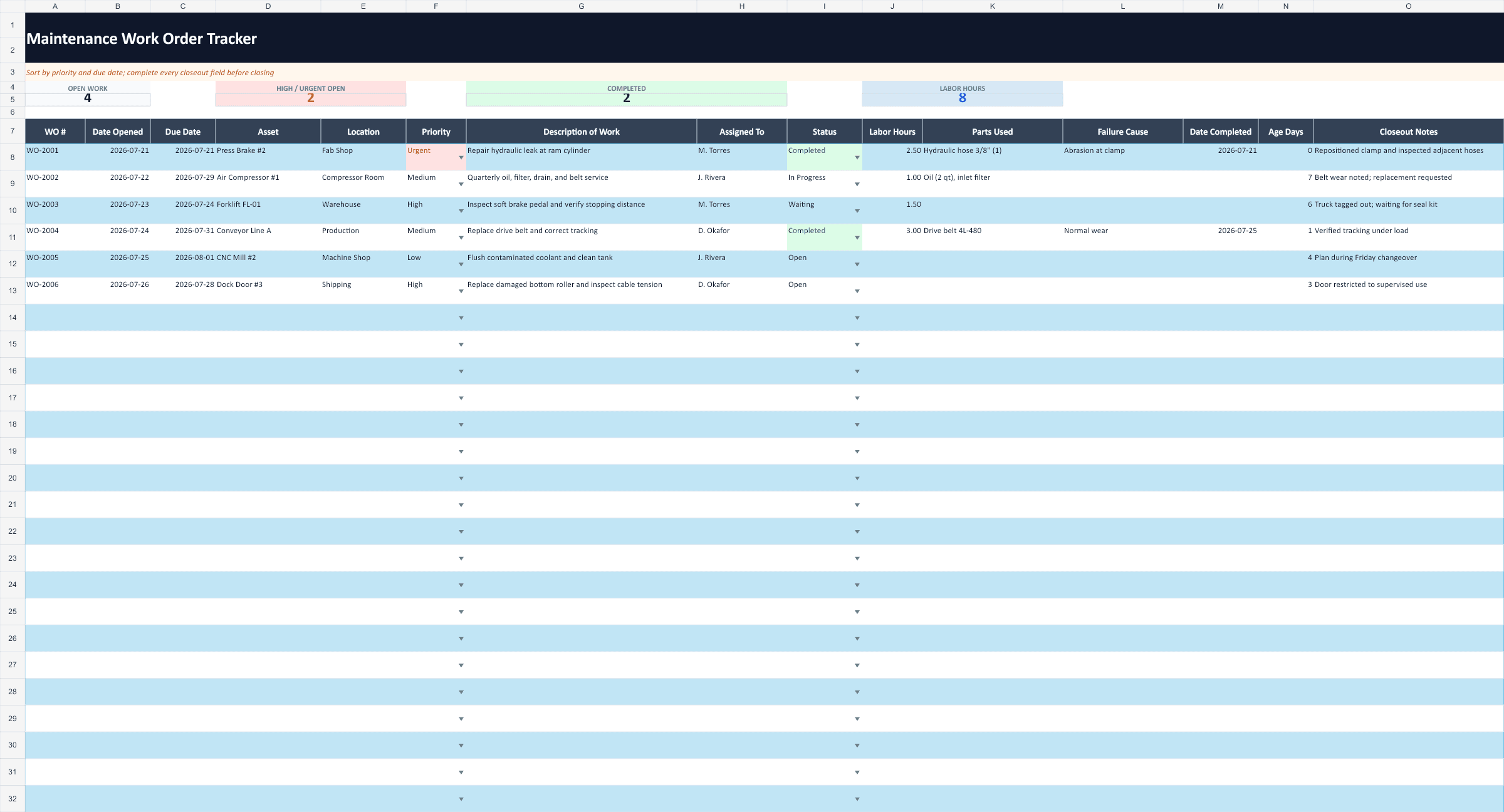
How to use this work order template
- Number work orders sequentially. WO-001, WO-002, and so on — one row per job. A unique number is what lets techs, operators, and managers all talk about the same job without confusion.
- Always record labor hours and parts. This is the discipline that pays off. A work order log with real hours and parts against every job is what makes repair-vs-replace decisions possible — you can finally see which machine has quietly eaten 40 hours and $2,000 in parts this year.
- Close the loop with the failure cause. When a job is done, write down why it failed, not just what was fixed. Patterns in the failure-cause column — the same worn hose, the same belt — are where preventive maintenance tasks come from.
Where a spreadsheet breaks down
A work order log like this works fine while one person runs it. The cracks show as soon as work has to move between people: a spreadsheet can't assign a job to a tech or notify them it exists, there's nowhere to attach a photo of the leak or the nameplate, and pulling the full repair history for one asset means filtering and hoping every row was typed consistently. That's usually when teams move to software built around the work order itself. We cover the habits that matter either way in our guide to maintenance work order best practices.
Frequently asked questions
What should a work order include?
At minimum: a unique work order number, the date opened, the equipment and its location, a priority, a clear description of the work, who it's assigned to, and the current status. To get real value from the log, also record labor hours, parts used, the failure cause, and the completion date — that history is what tells you which machines are costing you the most.
How do you prioritize work orders?
A simple three-level scale works for most small teams: High for safety issues and breakdowns that stop production, Medium for problems that degrade performance or will get worse if ignored, and Low for cosmetic or convenience items. Work the highs first, batch the lows into slow periods, and re-check priorities weekly so nothing quietly ages into an emergency.
How long should you keep work order records?
Keep them for the life of the asset at minimum — repair history is what makes repair-vs-replace decisions possible, and it's often requested during audits, insurance claims, and warranty disputes. Many teams keep 3–7 years of records as a baseline; digital storage is cheap, so when in doubt, don't delete.
Skip the spreadsheet wrangling
RunTight turns this log into mobile work orders your techs complete in 2 minutes — free for teams up to 25, no per-user fees.
Start live work orders